
A profile that's actually finished.
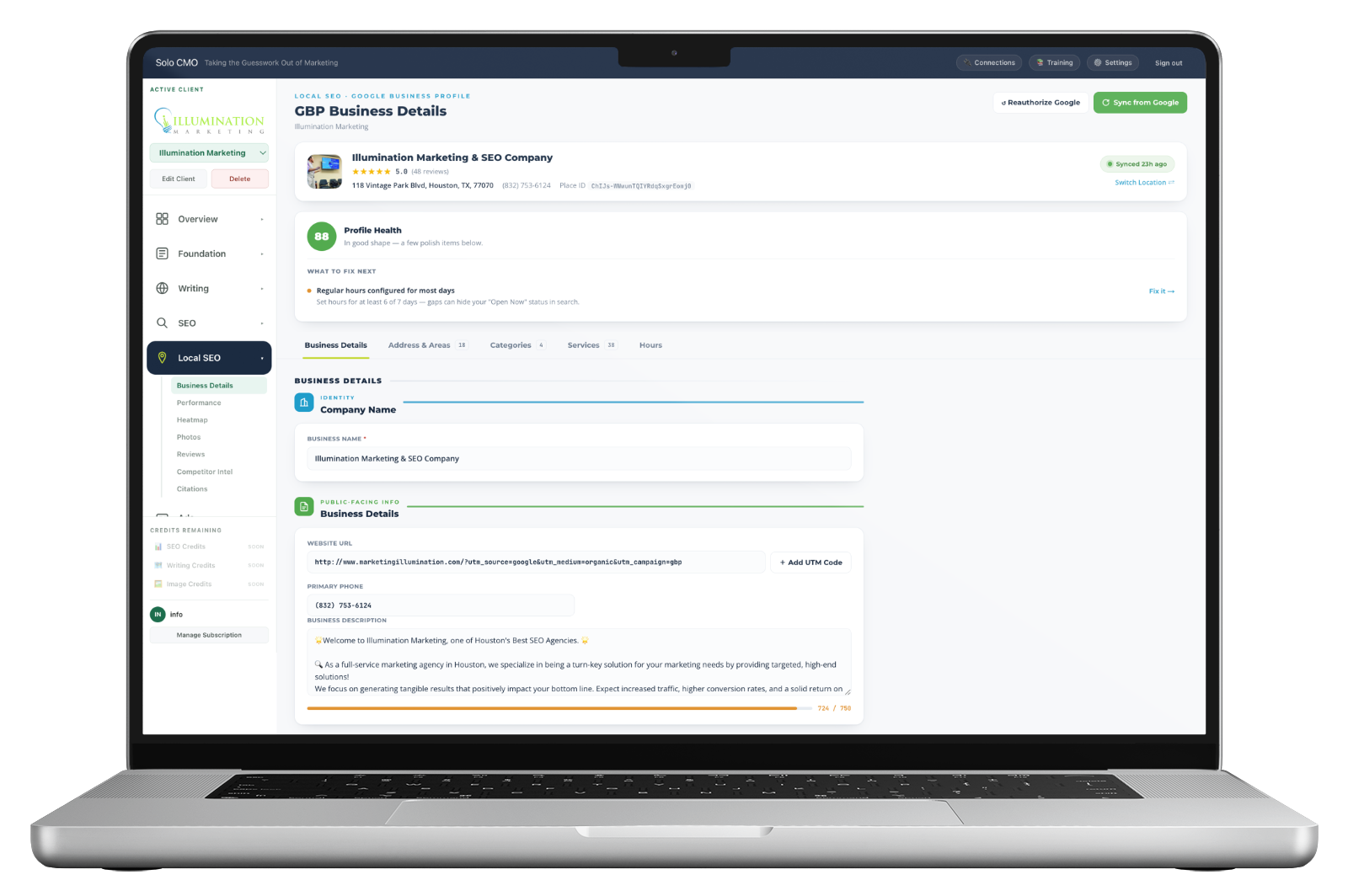
The whole Google Business Profile on one screen — name, description, categories, service areas, hours and every service — edited here and pushed straight to Google when you save.
Including the thirty-eight service descriptions nobody has ever written by hand.
The highest-leverage asset in local SEO is the one nobody finishes.
The profile decides what a business is eligible to rank for, and everybody knows it. Then filling it out properly means Google's own interface — fields scattered across screens, no sense of what's missing, no indication which parts actually matter, and a separate login per client.
So the categories get set once at onboarding and never revisited, the service list stops at four, and the descriptions are left blank because writing thirty-eight of them is a morning nobody has. At fifteen clients that's fifteen profiles quietly running at half strength.
Thirty-eight services. Every description written in one click.
Services are what a profile can be matched against, and a named service with no description is half a listing. The ones missing descriptions are outlined in amber so the gap is visible at a glance — and one action fills every one of them.
It's the difference between a profile that lists thirty-eight services and a profile that describes them.
5 services have no description. Amber outline means Google has a name and nothing else to match against.
Write all descriptionsIllustrative. Real profiles usually arrive with far more than five blank.
A to-do list of one.
A completeness and quality read on the profile, with the single highest-value thing to fix named underneath it and a link straight to the field that needs it.
Not a checklist of forty items you'll skim and close. One thing, the reason it matters, and the shortest route to fixing it.
- Scored out of 100, so progress across a roster is comparable
- The next fix named, with what it costs the client if left
- A direct link to the field rather than a description of where to find it
- Recalculated on every sync, so it reflects the profile as it stands today
A few polish items below.
Regular hours configured for most days
Set hours for at least 6 of 7 days — gaps can hide the "Open now" status in search.A real profile at 88. The fix named here takes about ninety seconds.
Categories decide what a business can rank for at all.
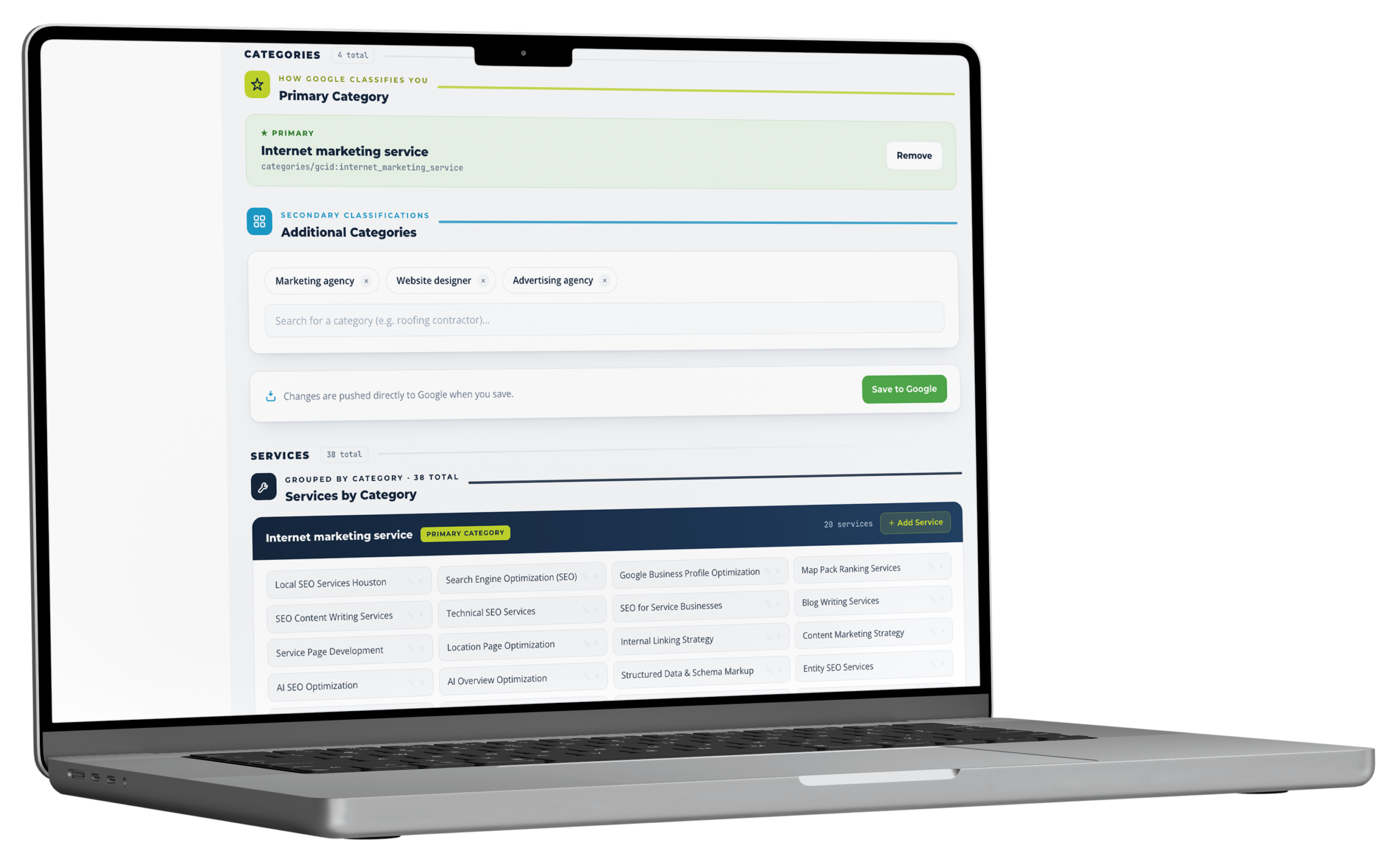
The primary category sets eligibility. Additional categories widen it. Get this wrong and no amount of content, links or reviews will fix it — which is why a category problem is the most common critical finding in a local diagnosis.
It's also a two-minute fix that most profiles have never had, because the person who set it up picked the closest-sounding option and moved on.
- Primary category shown with its Google identifier, not just its label
- Additional categories added and removed as chips
- Services grouped under the category they belong to
- Search across Google's real category taxonomy rather than guessing
The fields that quietly decide whether a profile works.
Address & areas
Where they operate, precisely
Storefront, service area, or both — plus every city, region and ZIP served, held as chips you can add to as the client expands.
Description
Written against the character limit
A live counter against Google's ceiling, so the description ends where you meant it to rather than being truncated mid-sentence in search.
Website URL
Tagged, so the traffic is attributable
A UTM builder on the profile link. Without it, everything the profile sends arrives as organic and the client never sees what it's worth.
Hours
Regular and special
Day by day, plus holiday overrides — because a profile showing "open now" on Christmas morning is worse than one showing closed.
Multi-location
Switched from the card
Each location carries its own details, categories, areas, services and hours. Franchise and multi-branch clients don't need a separate account.
Identity
Place ID on screen
The identifier every other local tool asks for, visible rather than hunted down through Google's lookup utility.
It edits the real profile.
Sync pulls the current profile in. Saving pushes the change straight to Google. There's no export, no copy-paste into the Business Profile interface, and no second version of the truth sitting in a tool.
Which is the only way this works across a roster. A dashboard that shows you fifteen profiles you then have to go and edit somewhere else has moved the work, not removed it.
Every module is on every plan. Plans differ only in how many clients you run.
What feeds it, and what it feeds.
- Google Business Profile
- Sync
- USP
- Description
- Rank Diagnosis
- What to fix
Feeds the profile
What operators run alongside it.
Business Details, answered straight.
Does it edit the real profile or just track it?
What does the AI write for services?
Why do categories matter so much?
What is the profile health score?
Can I manage more than one location?
Every plan includes every module.
There are no feature gates. Plans differ only in how many clients you run and how much you generate for them.