
You're already ranking for it. Your page never said it.
It pulls every query Google shows a page for, crawls the live page, and compares the two — so you can see which terms you're earning by accident, which ones you aimed at and missed, and exactly where on the page each gap sits.
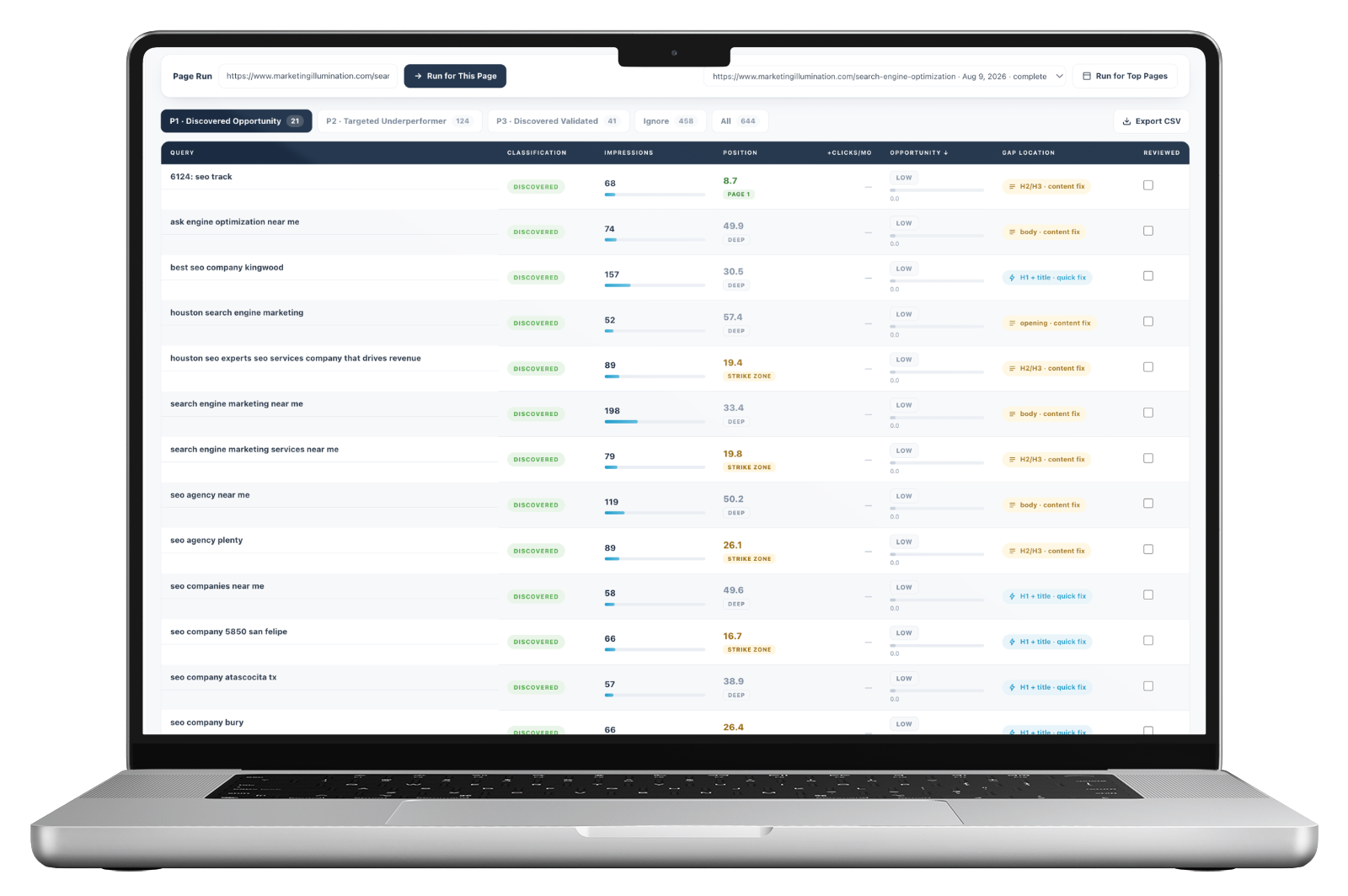
The cheapest ranking available is on a page that already exists.
Every published page picks up queries nobody planned for it. Most are noise. A few are a page sitting at position eleven for something the business actually sells, missing two sentences and a heading that would settle it.
Finding those means opening Search Console, filtering to one page, reading a few hundred queries, and then checking each promising one against what's actually written on the page. It's an hour per page, it's the highest-return hour in SEO, and nobody at fifteen clients has ever done it twice.
Targeted, or discovered.
The finder crawls the live page and compares it against what Search Console reports, which is how it can tell the difference between a query the page was built for and one Google decided it deserved anyway.
That distinction changes what you do. A targeted query sitting at fourteen means the page tried and fell short. A discovered query at fourteen means the page is ranking without trying — and a small deliberate change could take it much further.
- Targeted — matches a keyword the page was built to rank for
- Discovered — Google ranks it for this anyway, unplanned
- Position banded as page one, strike zone at eleven to thirty, or deep
- Impressions shown per query, so demand is visible not assumed
- Estimated recoverable clicks if the page were lifted onto page one
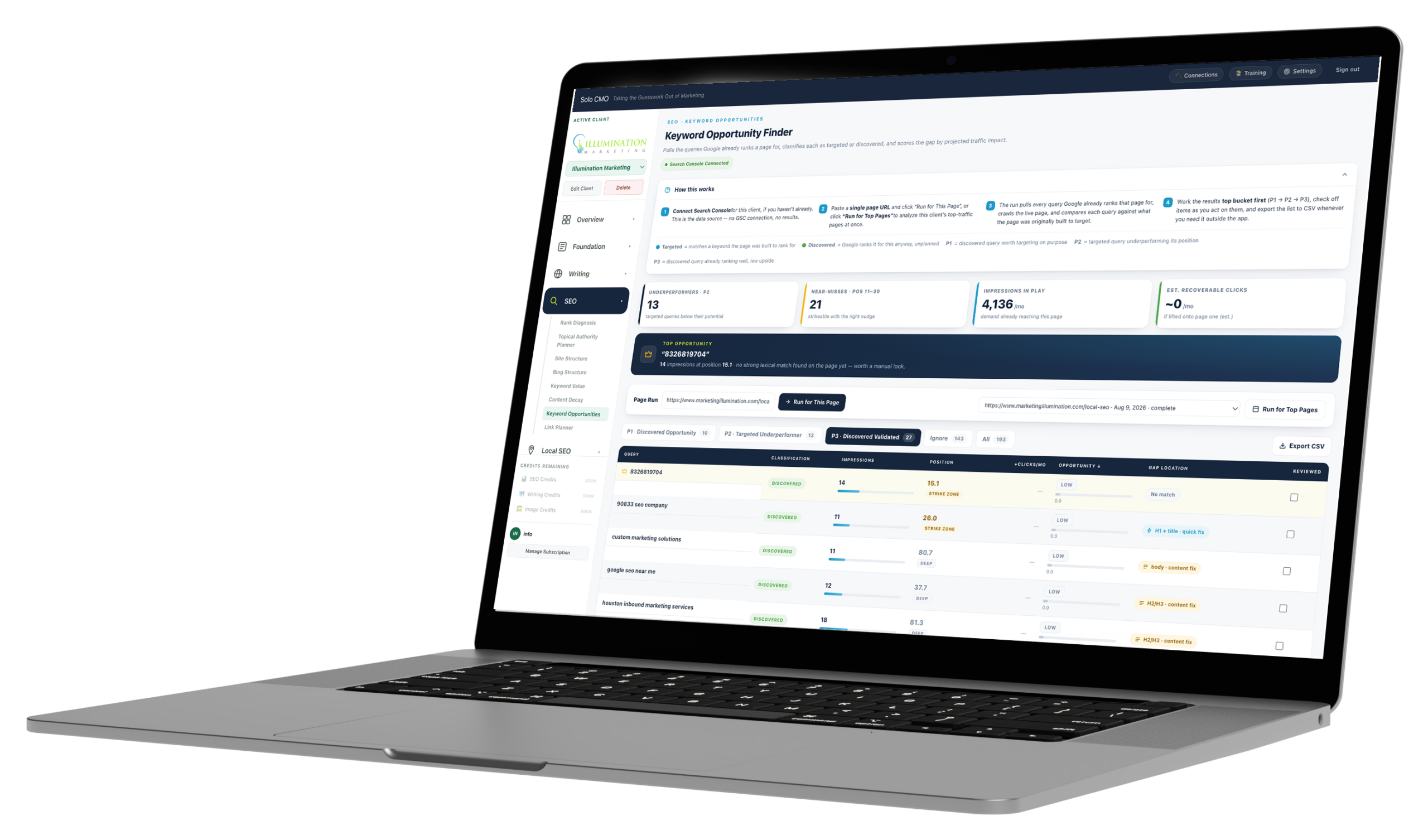
310 queries in. Seven worth doing first.
A page can surface for hundreds of queries, and a tool that hands you all of them has moved the problem rather than solved it. Everything gets sorted into three priority buckets and an ignore pile, so the list you start on is short enough to finish.
P1
7
Discovered opportunity
Google found it for you. Worth targeting on purpose, because the page is already halfway there without trying.
P2
39
Targeted underperformer
You built for this and it's sitting below its potential. Usually the fastest movement available on the page.
P3
32
Discovered validated
Already ranking well without being planned. Low upside, but worth knowing you own it before you change anything.
Ignore
232
Noise
Three quarters of what a page surfaces for isn't worth an hour of anyone's time. Saying so is the useful part.
A real run on a single page. The ignore count is the number most tools would have shown you anyway.
It tells you where on the page the gap is.
Every other tool stops at "you rank fourteenth for this, try harder." That's an observation. This names the location — the term is missing from the title and H1, or from the subheadings, or from the body, or from the FAQ — which turns it into a task somebody can actually do this afternoon.
It also sorts the work by effort. Some of these are a fifteen-minute edit. Some need a section written.
It's ranking on relevance alone, with the query absent from the two places that matter most. Usually a same-day edit.
The page covers the topic but never gives this question its own heading. A subsection, not a rewrite.
Google is matching on context rather than substance. The page needs to actually say the thing it's ranking for.
Query phrased as a question, page has no matching Q&A. The cheapest kind of addition, and it feeds featured snippets.
One page, or the pages that matter.
Paste a URL to work a single page, or run the client's top-traffic pages together. Everything is built to be worked through rather than admired.
Top opportunity
The single best move, named
One query pulled to the top with its impressions, position and gap — so there's always an obvious place to start.
Reviewed
Check things off as you act
A tick box per row, because a list you can't mark up is a list you'll re-read from the top next month.
Export
CSV when it needs to leave
For a client, a VA, or a spreadsheet you already live in. The work doesn't have to stay in the app to be useful.
Every module is on every plan. Plans differ only in how many clients you run.
What feeds it, and where the fix happens.
- Search Console
- The queries
- Live page crawl
- The content
- Content Decay
- Which pages
Feeds the finder
What operators run alongside it.
Keyword Opportunities, answered straight.
What's the difference between targeted and discovered?
What does gap location mean?
Why are most queries ignored?
Do I run it page by page?
Does it rewrite the page?
Every plan includes every module.
There are no feature gates. Plans differ only in how many clients you run and how much you generate for them.