
The client stopped sending photos. It stopped mattering.
See how long it's been since a profile got anything new, then generate on-brand images of that client's actual staff, in their actual premises, and publish them to the listing already categorized.
Nobody picks up a camera. Nobody sends a reminder email.
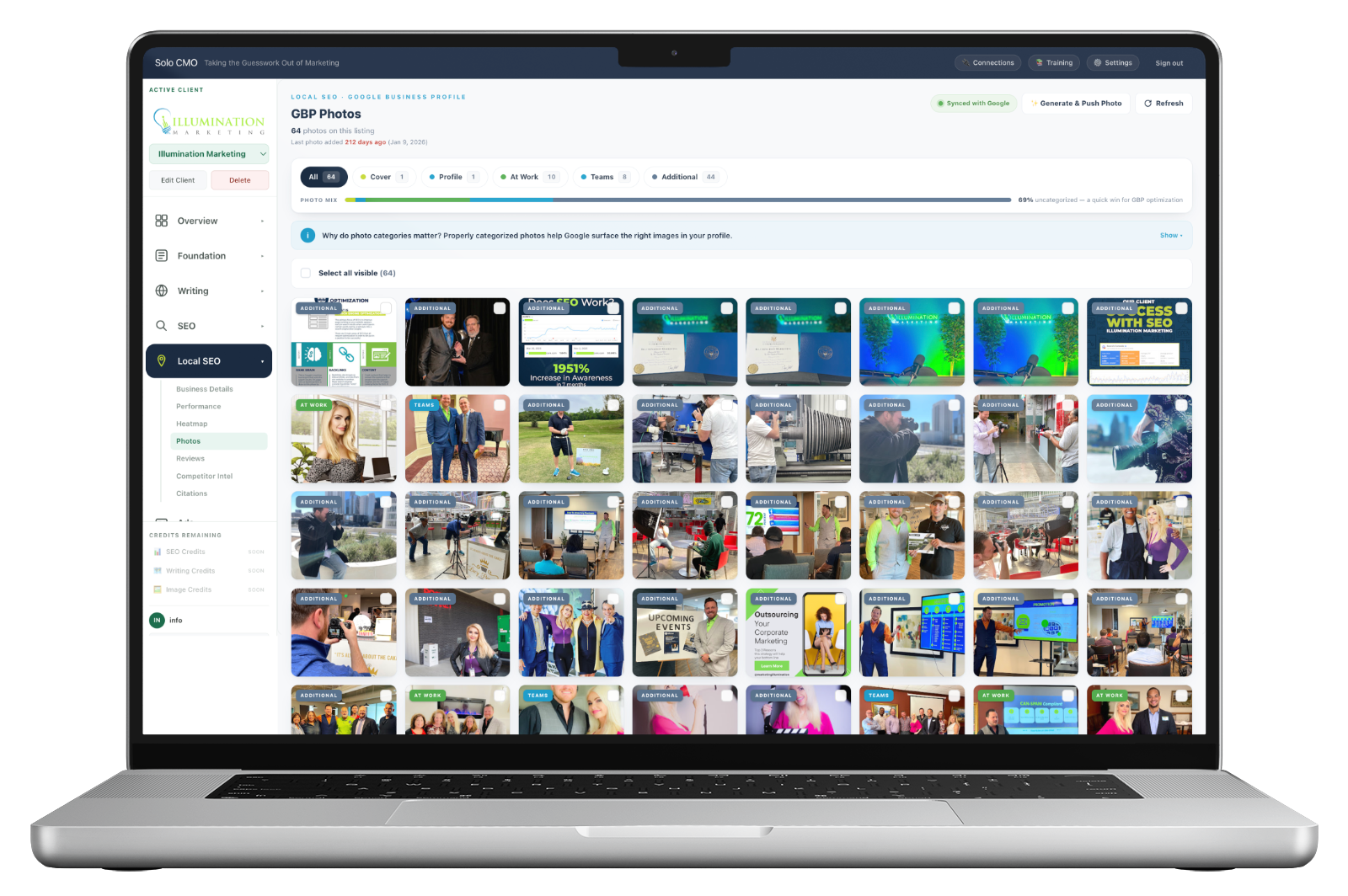
Every local profile goes quiet, and it's never the agency's fault.
You ask for photos at onboarding and get a few. You ask again in month three and get a promise. By month eight you've stopped asking, because chasing a plumber for jobsite pictures is not a good use of anybody's Tuesday.
Meanwhile the profile sits there with the same eleven images it had a year ago, looking exactly like a business that stopped trying — to the customer scrolling past it, and to the system deciding which businesses to show.
When did this profile last get anything new?
It's not a question anyone asks until a diagnosis raises it, because Google's interface doesn't surface it and nobody scrolls a photo library counting backwards. Every listing carries the answer, and the ones that have gone quiet get flagged.
340days
Freshness is a signal. A library that hasn't moved in a year reads as a business that isn't operating — and it's the kind of decay that never shows up in a traffic report because it isn't traffic.
DormantTheir staff. Their building. Photos that didn't need taking.
The assets are already on file — the headshots, the premises, the vehicle, the logo, uploaded once when the client came aboard. The same library the article images draw on, pointed at a different destination.
Generate a set, approve what's good, and it publishes to the listing with the right Google category already attached.

Real people
The staff a customer will meet
Generated from the client's own headshots, so the faces on the profile are the faces at the door — not a stock technician forty other businesses are also using.
Categorized on publish
Filed before it lands
Each generated image goes up with its Google category already set, so the library never accumulates another pile of uncategorized "additional."
Approved first
Nothing publishes unseen
You review the set and choose what goes. Nothing reaches a client's profile without a person having looked at it.
Every module is on every plan. Plans differ only in how many clients you run.
Google can't surface a photo it can't identify.
Categories tell Google which image to show where. An uncategorized photo is one it has to guess about, and guessing usually means not choosing — so a profile with plenty of decent photography can still be presenting the wrong two.
Most listings arrive with the majority of the library filed as "additional," because fixing it in Google's interface means opening every image one at a time.
- Every photo on the listing in one grid with its current category
- Counts per category, and the uncategorized share called out
- Multi-select or select-all, then set the category in one pass
- Gaps made obvious — forty product shots and no team photos is a conversation
A real listing. Two-thirds of the library tells Google nothing.
Where it fits.
The photo library is one of the six sources the rank diagnosis reads, and a thin or stale library is a common finding in it. This is the module that closes that finding without going back to the client.
- Google Business Profile
- Sync
- Client asset library
- Staff & premises
- Business Details
- The listing
Feeds Photos
What operators run alongside it.
Photos, answered straight.
How do I know a profile has gone quiet?
Where do the generated photos come from?
Do the generated photos go straight onto the listing?
Why do photo categories matter?
Can I fix the existing library in bulk?
Every plan includes every module.
There are no feature gates. Plans differ only in how many clients you run and how much you generate for them.