
Catch the slide before it becomes a drop.
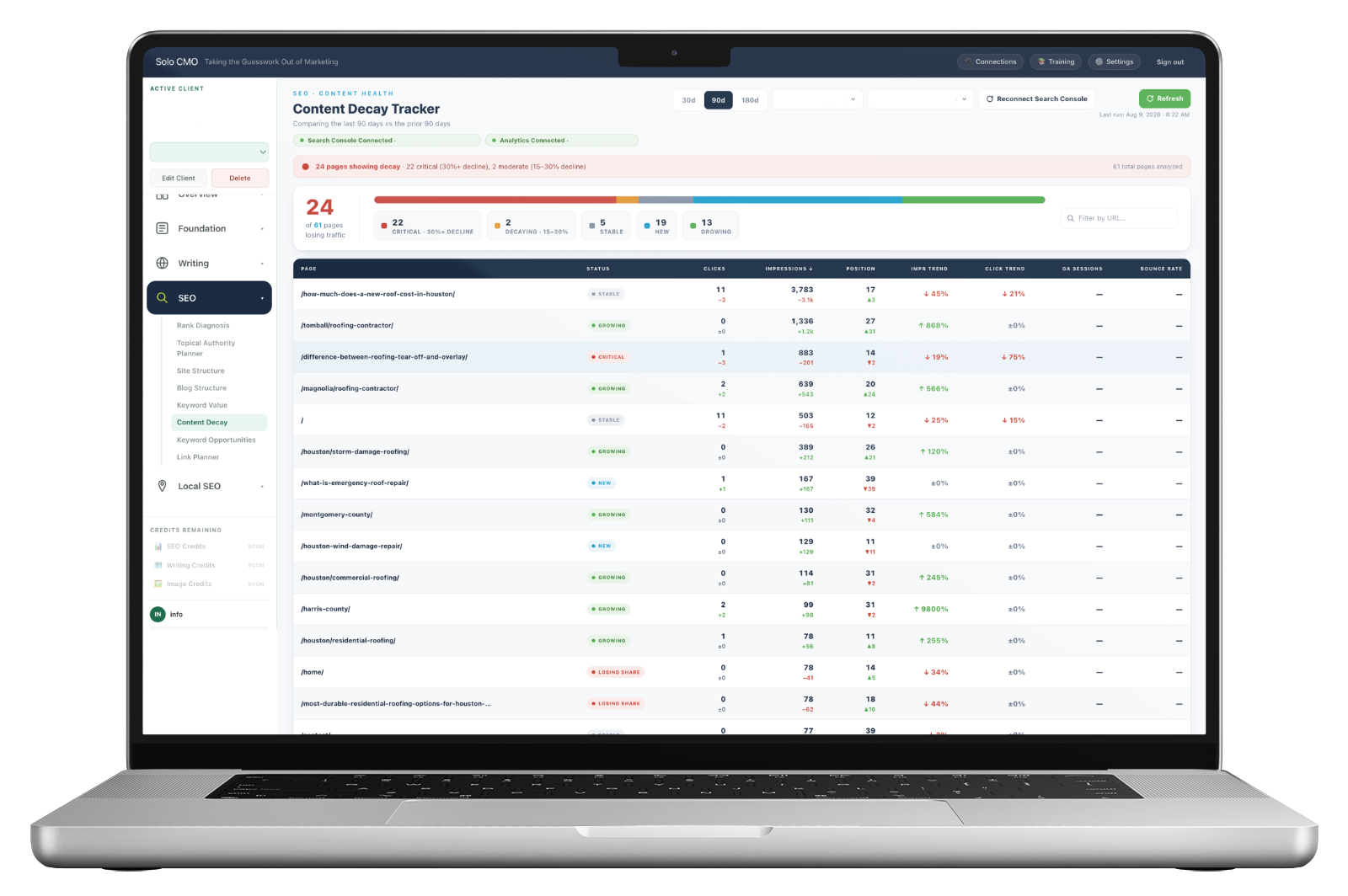
Every indexed page on the client's site compared against its own previous period, sorted so the ones losing visibility fastest sit at the top — with impression trend leading, because impressions fall weeks before clicks do.
Decay hides inside a total that looks fine.
The monthly report says traffic is flat. Underneath it, nine pages are climbing and eleven are quietly sliding, and the two cancel out. Nobody notices, because nobody reads a site page by page — and a page that fell from forty clicks to two disappears into an aggregate without leaving a mark.
By the time it shows up in the total, the page has usually been slipping for two or three months. That's the difference between refreshing something that still has authority and rebuilding something that's already gone.
Five states, and the thresholds are stated.
No page sits in an undefined middle. A drop over thirty percent is critical, fifteen to thirty is decaying, and everything else is stable, new or growing — so the shape of a client's whole site is one line at the top of the screen.
A real client at ninety days. Note that this is a full picture — the growing pages are as useful to know about as the failing ones.
Clicks tell you it happened. Impressions tell you it's happening.
A page loses visibility before it loses traffic. It gets shown for fewer queries, and shown lower on the ones it still appears for — and both of those register as impressions falling while the click count sits still, because the handful of people who were clicking are still clicking.
Which is why the table sorts by impression trend rather than clicks. The pages at the top are the ones on their way down, not the ones already there.
The early signal
Impressions collapse, clicks flat
The page is being shown far less than it was, but the small number of clicks it earned hasn't moved yet. Nothing in a traffic report would flag this. It's the most recoverable moment there is.
The late signal
Both falling together
By the time clicks follow impressions down, the position loss is established and a competitor has usually taken the ground. Recovery costs more than prevention would have.
Both patterns taken from the same real client, same ninety-day window.
Search Console and Analytics, on the same row.
Impressions, clicks and average position come from Search Console. Sessions and bounce rate come from Analytics. Seeing them beside each other is what separates a page losing rankings from a page still ranking that people no longer want to read.
Both are the client's own connected properties, so this is what happened on their site — not an estimate from a third-party index.
- Impressions, clicks and average position with the change on each
- Sessions and bounce rate alongside, from the same period
- Thirty, ninety or one hundred and eighty day windows
- Every page compared against its own prior period, not a site average
- Filter by URL to check a silo or a single page

It finds them and ranks them. You decide what they need.
There's no single fix for a decaying page, and a tool that pretended otherwise would send you to rewrite things that only needed a link. What the decay list gives you is a short, ordered set of pages worth an hour of thought — which at fifteen clients is the difference between doing the work and meaning to.
Sometimes
The page needs refreshing
Prices, dates, examples and answers that were true two years ago. The cheapest fix, and the most common one.
Sometimes
It lost its support
Internal links that never got built, or a silo that stayed thin while a competitor filled theirs in.
Sometimes
It was never going to hold
Some pages lose because something better exists now. Knowing which ones to let go is worth as much as knowing which to save.
Every module is on every plan. Plans differ only in how many clients you run.
What feeds it, and where the fix happens.
- Search Console
- Visibility
- Analytics
- Behavior
- Site Structure
- The pages
Feeds the tracker
What operators run alongside it.
Terms a page already earns that nobody targeted — often the fix for a slipping page.
Rank DiagnosisWhy the site as a whole sits where it does, not just page by page.
Site StructureWhere every page and its live numbers are tracked.
Content ReportThe monthly narrative a client actually reads.
Content Decay, answered straight.
Why does impression trend matter more than clicks?
What counts as decay?
What is it comparing against?
Where does the data come from?
Does it fix the decaying pages?
Every plan includes every module.
There are no feature gates. Plans differ only in how many clients you run and how much you generate for them.