Content Generation

The signs of blog content not ranking are no cluster of 8+ supporting posts, no pillar page, several URLs competing for one query, orphaned posts, and traffic held up by a handful of pages. Before you write a word of consolidated copy with content generation, run the diagnosis: nine checks, each doable in about an hour, and one score that tells you whether to restructure.
Key Takeaways
- Flat traffic on a consistently updated blog usually points to structure, not effort or writing quality.
- Nine observable symptoms explain it, and each can be verified in Google Search Console, Ahrefs, Semrush, or Screaming Frog SEO Spider.
- Four or more yes answers on the 10-point mini audit means restructure before publishing anything new.
- The fix runs in four steps: consolidate, redirect, build pillars, relink.
- Plan for a 2-3 week traffic dip and scope the work in days to weeks, not months.
What Does It Mean When Blog Content Is Scattered?
Scattered content is a body of work that touches many unrelated themes without covering any of them thoroughly. Picture an archive containing a post about a product launch, another about hiring, a third about a conference recap, and a handful of how-tos that never link to one another. If you have just inherited a blog like that, the pattern is common and fixable, and the checks below will show you how deep it runs.
Cluster Content Explained
A topically focused site covers a few subjects in real depth, and each subject has a hub page, a set of supporting posts, and links running in both directions. A scattered site, by contrast, spreads thin coverage across many subjects, so no single theme registers as an area of expertise. That gap is what topical authority measures: how completely a site covers a subject compared with the alternatives. Your content can be well written and still appear shallow when it stands alone.
For a non-technical stakeholder, try this analogy: a library with ten books on forty subjects loses to a library with forty books on ten subjects.
How Google Evaluates Topical Depth
Google does not score each post in isolation. Its Helpful Content system, which began in August 2022 as a site-wide signal, was folded into core ranking systems in March 2024 [1]. Google’s guidance says removing unhelpful content could help the rankings of your other content [2]. That is not a penalty, but it does mean weak pages can shape how a search engine interprets the whole site.
Quality also runs through E-E-A-T (Experience, Expertise, Authoritativeness, Trustworthiness). Experience and expertise show most clearly when a site returns to a subject repeatedly with specific, useful detail, and a cluster of eight or more supporting posts is the practical benchmark for that kind of depth.
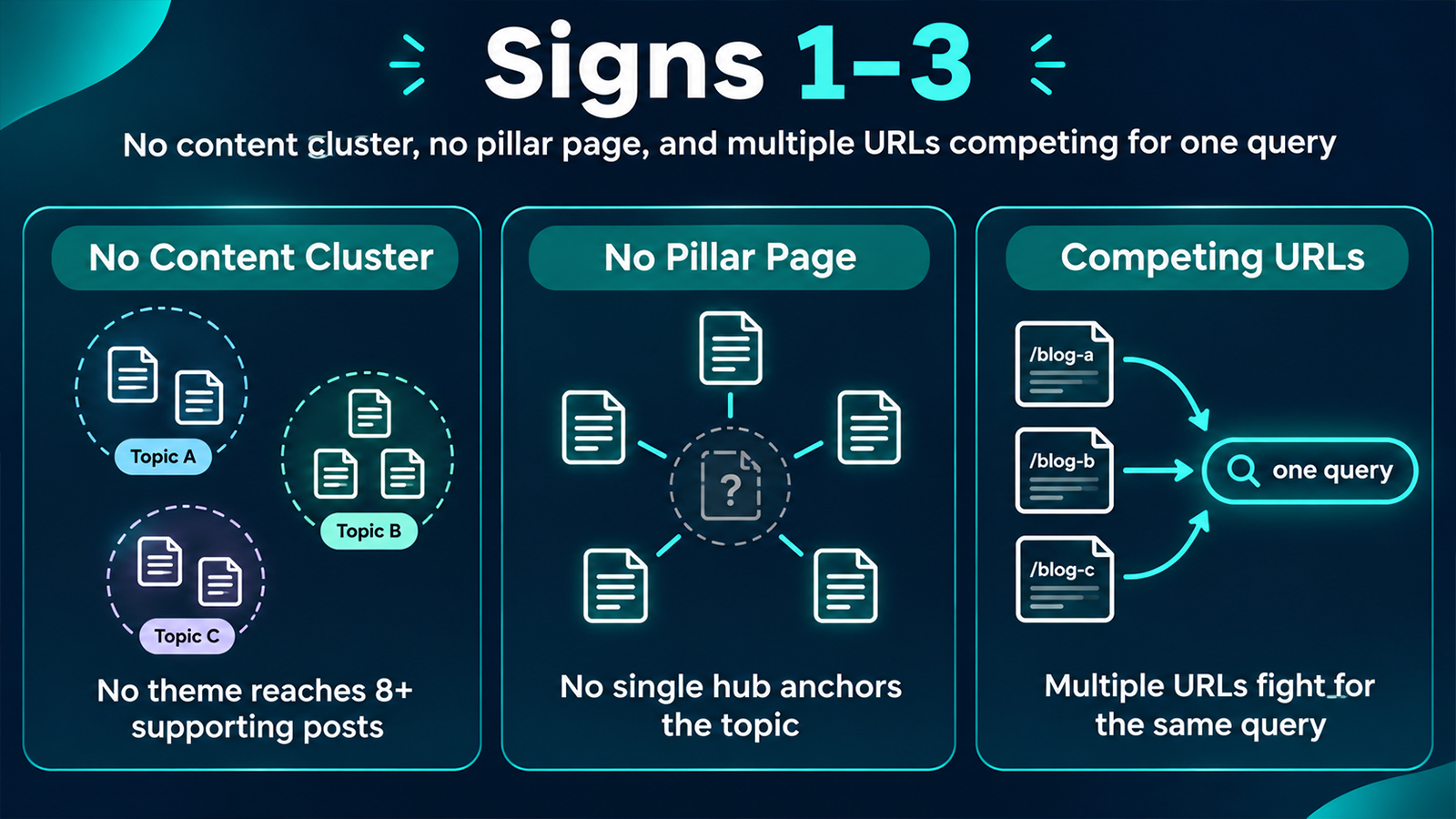
Signs 1-3: No Content Clustering, No Pillar Page, and Multiple URLs Competing for One Query
Sign 1: No Content Cluster of 8+ Supporting Posts
A scattered blog has dozens of themes with two or three posts each, so thin coverage never signals expertise and no single subject builds momentum. Industry guidance puts a healthy pillar at roughly eight supporting articles, with larger programs running considerably higher [3].
How to check it: export pages from Google Search Console, or pull Organic Keywords in Ahrefs. Group the URLs by theme in a spreadsheet and count the posts per theme. If no theme reaches eight, you do not have a content cluster.
Sign 2: No Pillar Page
Content pillar pages are broad, authoritative hubs that cluster pages link to, and they anchor each theme. This kind of pillar content gives supporting posts something to point toward, and each pillar topic should have exactly one hub. In the HubSpot topic cluster model, every piece of cluster content links to the pillar, while the pillar links back out [3]. Without that hub, link equity spreads evenly and nothing anchors the topic.
How to check it: crawl the site with Screaming Frog SEO Spider, open the Inlinks tab on your candidate hub page, and count how many related posts point to it. A genuine pillar usually has the highest inlink count in its theme, so if yours does not, the hub is missing.
Sign 3: Multiple URLs Competing for the Same Query
This is keyword cannibalization. In the Search Console Performance report, filter by a query and open the Pages tab; if three URLs trade the same query week to week, none holds a stable position.
Most overlap is harmless, since Ahrefs found that only about 1 in 80 suspected cases needed fixing [4]. The deciding factor is intent: if the URLs answer the same question in the same format, they compete. Cannibalization rates under 5% of tracked queries are generally treated as healthy, while rates over 10% are considered structural [5].
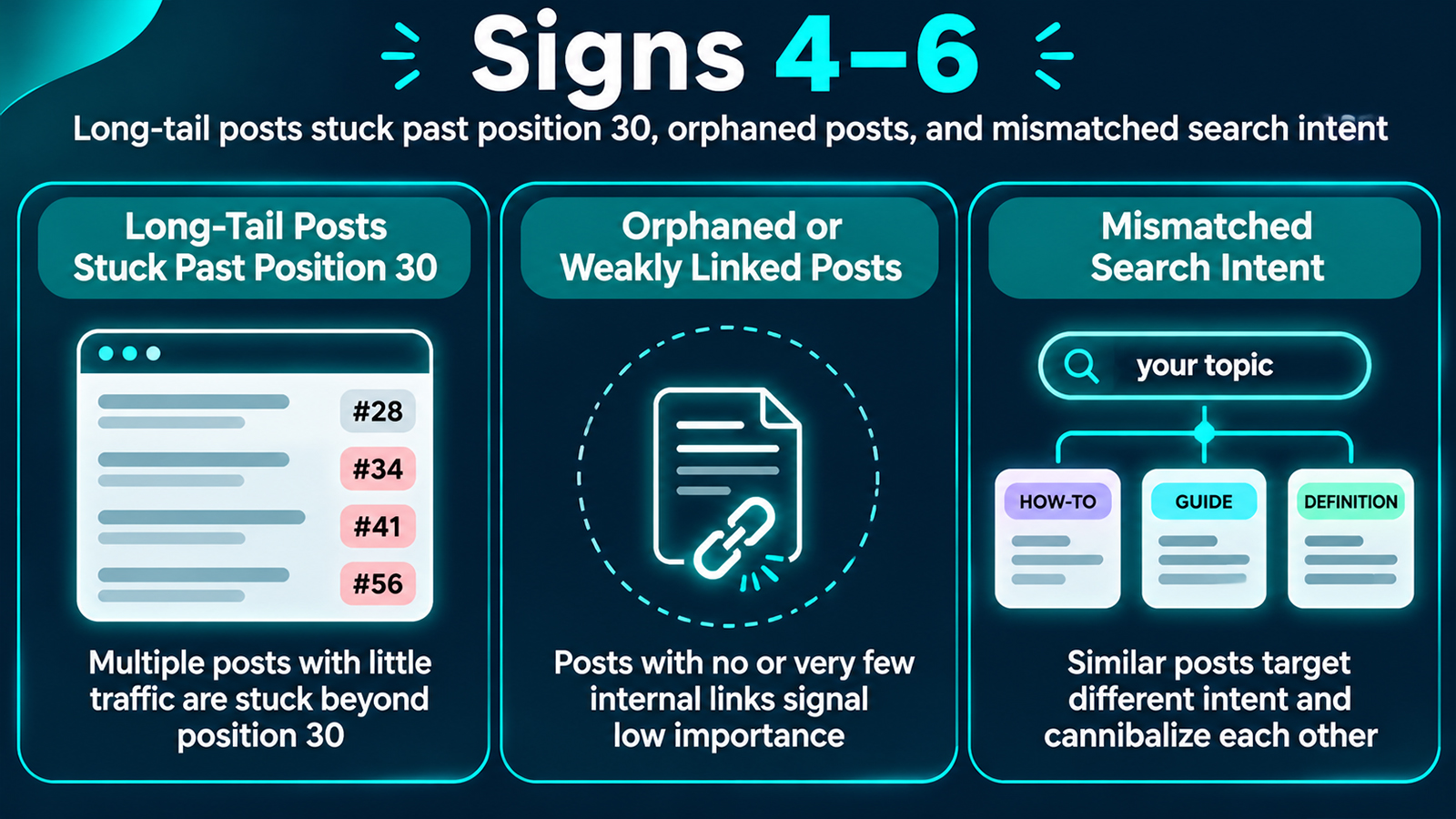
Signs 4-6: Long-Tail Posts Stuck Ranking Past Position 30, Orphaned Posts, and Mismatched Search Intent
Sign 4: Long-Tail Posts That Never Rank Above Position 30
Open the Search Console Performance report, add an average position filter greater than 30, and sort by impressions. A long list of posts with few impressions and almost no clicks means those pages sit where no one scrolls, and past position 30 a page will not reach the first screen of results without meaningful changes.
Corroborate the pattern in Semrush Position Tracking for your target terms. A few such posts are normal, but hundreds signal sprawl.
Sign 5: Orphaned or Weakly Linked Posts
An orphan has no internal links pointing to it. Google may have discovered the URL through a sitemap, yet a page nobody links to signals low importance.
Search Console alone cannot surface orphans, because it only reports pages that earned impressions. Run Screaming Frog with the Search Console and Google Analytics 4 APIs connected, then open the Orphan Pages report [6]. In Semrush, the Site Audit Incoming Internal Links report reveals pages with one link or none.
Sign 6: Inconsistent Search Intent Across Similar Posts
Two posts on one subject may pursue different needs: one a how-to, one a buyer’s guide, one a definition. When the format does not match what the results page rewards, readers bounce.
Search the target query and compare the top results to your page, then check Google Analytics 4 engagement for the mismatched URLs. Pages with low engagement rates and short average engagement time often have a search intent problem rather than a writing problem, so consolidate them or re-angle them.
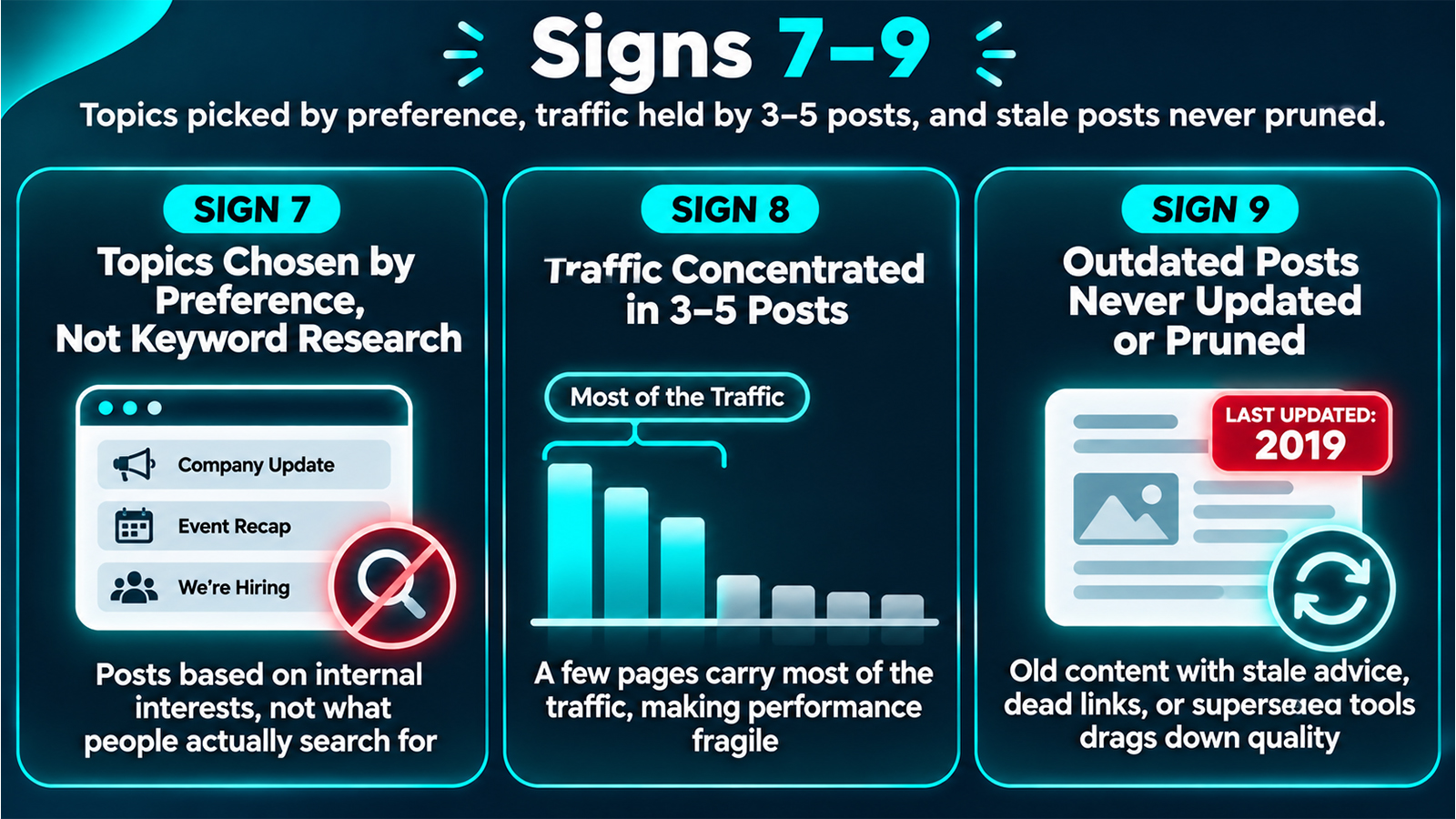
Signs 7-9: Topics Picked by Preference, Traffic Held by 3-5 Posts, and Stale Posts Never Pruned
Sign 7: Topics Chosen by Internal Preference, Not Keyword Research
If the editorial calendar originated from the founder’s interests, product news, or whatever a team member felt like writing, the archive will reveal it. A preference-driven content strategy produces posts no one searches for: company updates, event recaps, and hiring announcements on a business blog.
How to check it: run Ahrefs Content Gap against two or three competitors. If rivals rank for a dozen subjects your client never covered, topic selection came from the inside out.
Sign 8: Traffic Concentrated in 3-5 Posts
Add the clicks from the top five URLs in Search Console, or landing-page sessions in Google Analytics 4, then divide by the total. If five pages carry most of the traffic, authority is fragile; the rest of the archive contributes little, and one algorithm shift or one decayed post can erase the site’s performance.
Sign 9: Outdated Posts Never Updated or Pruned
Old posts with stale advice, dead links, or superseded tools drag down perceived quality. HubSpot reported a 106% increase in organic views from historical optimization of old posts [7]. Treat that as HubSpot’s result, not a promise.
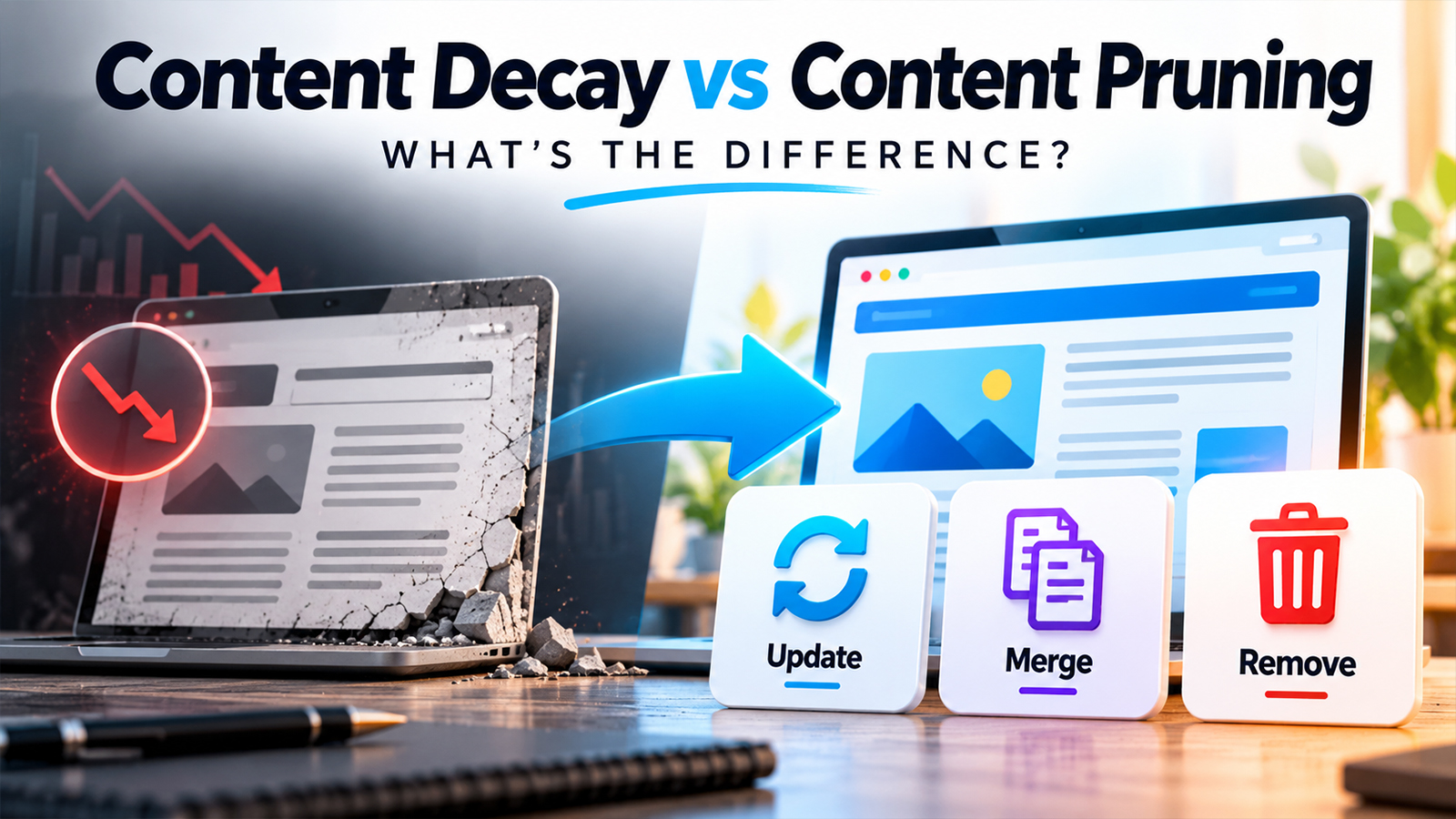
Pruning is triage, not mass deletion, and each old post receives one of four outcomes: update, merge, redirect, or remove. That approach aligns with Google’s guidance on removing unhelpful content [2].
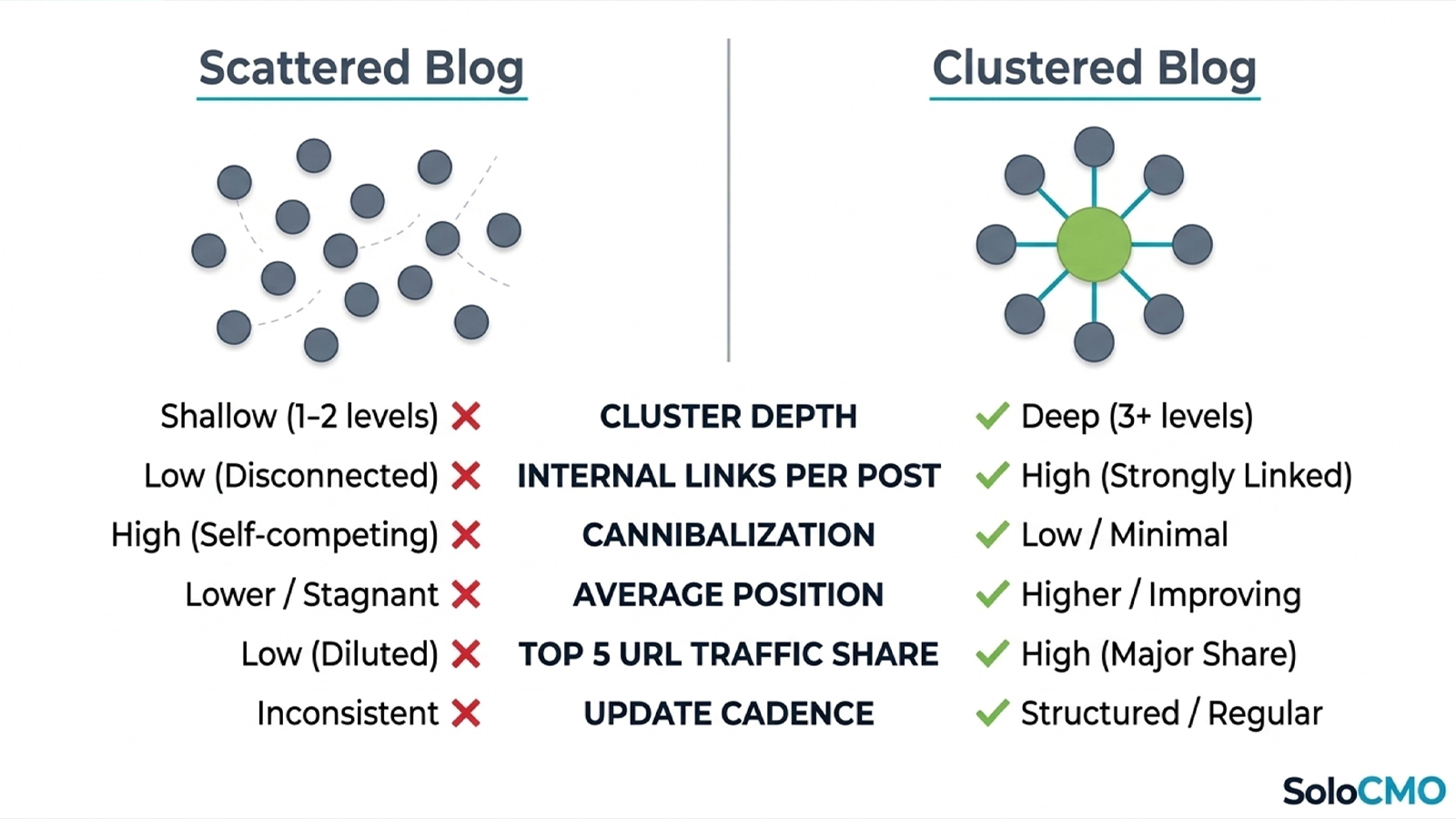
Scattered Blog vs. Clustered Blog: What Does the Difference Look Like?
Content clusters leave a measurable footprint. The table below shows rule-of-thumb ranges rather than universal standards, so use them to start a conversation with a client.
The Six-Metric Comparison
| Metric | Scattered Blog | Clustered Blog |
|---|---|---|
| Cluster depth | Under 4 supporting posts per theme | 8+ supporting posts per pillar |
| Internal links per post | 0-2 | 4+ |
| Cannibalization rate | Over 10% of tracked queries | Under 5% |
| Average position | Past 30 for most posts | Top 10-20 for core themes |
| Share of traffic from top 5 URLs | Majority of total | Spread across many URLs |
| Update cadence | Rarely or never | Scheduled reviews |
The Before/After Sitemap Picture for Non-Technical Stakeholders
Show the client two diagrams. In the first, hundreds of dots sit alone with a few random lines between them; in the second, five hubs sit at the center with spokes linking in and out. That one picture explains topical sprawl faster than any spreadsheet, and it gives a skeptical stakeholder something concrete to react to.
The 10-Point Quick-Scoring Mini Audit
Answer yes or no for each item. Four or more yes answers means restructure before publishing more. Keep a copy of your answers in the audit file, since a written score is easier to defend in a client meeting than a hunch.
- No theme has 8 or more supporting posts.
- No pillar page exists for the main subject.
- Three or more URLs trade the same query.
- More than 40% of posts sit beyond position 30.
- Orphaned posts make up more than 10% of the archive.
- Similar posts target conflicting search intent.
- The calendar came from internal preference, not research.
- Five or fewer URLs carry most of the traffic.
- Posts older than two years have never been reviewed.
- The client’s instinct is to publish more instead of fixing structure.
If your score lands at four or more, the next question is scope, and the section below walks through it.
What to Do Next: Consolidate, Redirect, Build Pillars, Relink
Fix structure before adding volume. New posts on a scattered archive inherit its weaknesses.
The Four-Step Order: Consolidate, Redirect, Build Pillars, Relink
Work in this order, because each step depends on the one before it. Consolidate overlapping or thin posts into one stronger page per intent, and redirect retired URLs with 301s to the closest surviving page. Build pillar pages for the three to five themes that matter most to the business, then relink using content clustering: every supporting post links to its pillar, and the pillar links back out.
Realistic Effort Ranges and the Expected Traffic Dip
These are planning estimates and vary with archive size. A solo operator working a 100-post archive might spend roughly one to two days on the audit, two to five days on consolidation, and a similar span on pillars and relinking, while larger archives scale up from there.
Expect a dip. Practitioners commonly report 2-3 weeks of lower traffic after a prune before recovery begins [8]. Tell the client before you start, not after. If you want to pressure-test your hours before you commit to a number, a quick scoping pass on the archive will usually settle it.
How a One-Person Team Compresses the Work with SoloCMO
SoloCMO is built around output multiplication for a team of one, with no collaboration or seat-based features that presume a larger staff. Its campaign and content generation modules help you draft pillar pages, produce consolidated rewrites, and brief supporting posts faster than starting from a blank page, and they support your content marketing plan. The diagnosis and the judgment calls remain yours, which is how it should be when the findings go in front of a client.
FAQ
What does it mean when blog content is scattered?
Scattered blog content covers many unrelated themes without depth, hub pages, or linking structure. Because each post stands alone, search engines perceive no area of expertise. Spotting this across hundreds of posts is where an experienced audit saves hours.
How do I know if I have keyword cannibalization on my blog?
You have keyword cannibalization when multiple URLs with the same keyword intent trade rankings for one query. In Search Console, filter by query, then open the Pages tab. Under 5% is healthy and over 10% is structural, though judging which overlaps matter takes professional judgment.
How many topics should a blog cover to build topical authority?
A blog should cover fewer subjects with real depth rather than chase a fixed number. A practical benchmark is one pillar plus roughly eight supporting posts per subject. Choosing which subjects to commit to is a strategic decision worth getting right before writing begins.
Does publishing more blog posts help SEO if the topics are unrelated?
Publishing more posts on unrelated topics does not help SEO and often dilutes focus. A one-off social media content post on a B2B software blog adds a theme without depth, whereas fixing structure first prevents wasted publishing spend.
How do I audit a blog for topical authority?
Audit a blog by running four checks in about an hour. Use Search Console for position and cannibalization, Ahrefs or Semrush for gaps and internal links, Screaming Frog for orphans, and GA4 for engagement, then score the results with the 10-point checklist. A scoped audit turns findings into a plan.
What is a topic cluster and how does it help rankings?
A topic cluster is a pillar page linked to supporting cluster content that covers related subtopics. In the HubSpot topic cluster model, cluster pages link to the pillar, which signals depth to search engines. Building one correctly means mapping existing posts first.
Conclusion
Blog content not ranking rarely means you need to publish more. Four or more yes answers on the audit means restructure first, and a tool-verified diagnosis gives you a verdict you can defend to any client, with a scope that does not require a team.
Sources
[1] https://developers.google.com/search/blog/2022/08/helpful-content-update?authuser=8 [2] https://developers.google.com/search/blog/2022/08/helpful-content-update?authuser=8 [3] https://blog.hubspot.com/marketing/topic-clusters-seo [4] https://www.smartsites.com/blog/keyword-cannibalization-in-seo-how-to-find-and-fix-it/ [5] https://www.nicodigital.com/technical-seo/keyword-cannibalization-audit-fix-internal-competition/ [6] https://www.screamingfrog.co.uk/seo-spider/tutorials/find-orphan-pages/ [7] https://contentpen.ai/seo-case-study/hubspot-blogging-case-study [8] https://thestacc.com/blog/content-pruning-guide/Recent Posts
Content Refresh vs Rewrite: Which Fixes Decaying Blog Posts Faster
A content refresh ships faster, usually in 1 to 3 hours versus 4 to 8 for a rewrite, but a rewrite recovers faster when the decay stems from a search intent mismatch. The rule of thumb is to refresh the post if it still matches what searchers want and most of it is salvageable, and to rewrite it if the

How to Build a Topic Cluster From Scratch for Your SaaS Blog
To build a topic cluster, pick a pillar topic that fits your product, collect subtopic keywords, group them by SERP overlap and intent, size the cluster, link every page to the pillar, publish in stages, then measure at cluster level. That is how to build a topic cluster in a way you can defend to a founder, and our topical authority

Where Leads Drop Off Between Ad Click and Signup
Funnel drop off between click and signup occurs at six points: the ad click, page load, above the fold, form start, form submit, and verification. The most significant leaks usually sit upstream, where the ad promise fails to match the page or where the page loads too slowly on mobile before the form ever appears. If your paid ad campaigns show
Get Smarter About Your Marketing
Practical SEO, AI, content, and marketing strategies you can put to work immediately.
Join the Newsletter