SEO

A content refresh ships faster, usually in 1 to 3 hours versus 4 to 8 for a rewrite, but a rewrite recovers faster when the decay stems from a search intent mismatch. The rule of thumb is to refresh the post if it still matches what searchers want and most of it is salvageable, and to rewrite it if the results page now rewards a different angle. Settling the content refresh vs rewrite question begins with diagnosing content decay before selecting a fix, so that organic traffic slipping across a client library stops being a guessing game.
Key Takeaways
- A refresh ships faster, whereas a rewrite recovers faster when intent has drifted.
- Diagnose first, naming the decay type (intent drift, outdated facts, competitive displacement, cannibalization, or technical and link decay) before choosing a fix.
- Keep the URL on a rewrite unless the topic itself changes.
- Recovery takes weeks, with first ranking movement in 2 to 4 weeks and stabilization in 4 to 8.
- Prioritize existing content by revenue link and decay type, and save new content for true gaps.

How Do You Know If a Blog Post Is Decaying (and Why)?
A post is decaying when clicks or impressions fall steadily over time rather than dipping for a season, and the underlying cause matters more than the size of the drop because the cause determines the appropriate fix.
Every figure in the table below is an illustrative planning range for scoping, not a guarantee.
How does the refresh vs rewrite comparison look at a glance?
The table compares the two paths on the factors that drive pricing and client conversations, and every number should be treated as an estimate you tune per client. If you want the cost column scoped for a specific library, you can request an estimate at the end of this article, no commitment needed.
| Factor | Content Refresh | Content Rewrite |
|---|---|---|
| Effort (illustrative) | 1 to 3 hours | 4 to 8 hours |
| Time to first ranking movement | About 2 to 4 weeks | About 3 to 6 weeks |
| Typical recovery window | 4 to 8 weeks | 6 to 12 weeks |
| Risk level | Low | Moderate |
| Best-fit decay type | Outdated facts, CTR decay, minor displacement | Intent drift, heavy displacement |
| Cost to client (illustrative) | Low end of a per-post range | Two to four times a refresh |
How do you read the Search Console 90-day comparison?
Open Google Search Console and compare the last 90 days to the prior period, then to the same window last year to rule out seasonality. Falling impressions point to ranking loss or intent drift, whereas steady impressions paired with a falling click-through rate suggest a weak title or a crowded results page. Cross-check landing-page sessions in Google Analytics 4 so the story holds across two tools, and log each ranking change next to the date of any update you shipped. That log becomes the evidence you hand a client later, so it is worth keeping from the first day. SoloCMO has a built-in module that does this for you.
How do you separate AI Overviews click loss from true decay?
When position and impressions hold but clicks fall, Google AI Overviews may be absorbing the click, which is a visibility problem rather than a post that needs rebuilding. From there, run three more checks: compare the live results page against your target keywords, then examine the Search Console query-by-page view for two URLs competing on one keyword. Crawl the URL with Screaming Frog for bad status codes, canonicals, or noindex tags, and check Ahrefs or Semrush for lost backlinks. Google’s own guidance discourages changing a date without substantive changes, so a cosmetic update will not conceal a genuine cause.

When Should You Rewrite a Blog Post Instead of Updating It?
Rewrite when search intent has changed or little of the old draft is worth keeping, and update when the structure is sound and the problems are factual or cosmetic. Google’s Helpful Content system and the expertise standards in the Search Quality Rater Guidelines (E-E-A-T) reward pages that satisfy the query, which is why intent changes outweigh cosmetic edits.
What thresholds should trigger a rewrite?
These are working rules of thumb, not Google-published numbers, so tune them per client. Before you refresh a page, run it through these tests.
- Ranking position: positions 4 to 15 with an intent match favor a refresh, while anything below position 20 with an intent mismatch favors a rewrite.
- Traffic drop: a decline under about 30% suggests a refresh, but one over about 50% with falling impressions suggests a rewrite.
- Salvageable content: above roughly 60 to 70% usable points to a refresh, and below about 40% points to a rewrite.
- Intent match: check whether the post still fits the current search intent shown on the live results page. If the top results are now comparison pages and yours is a how-to, no amount of polish closes that gap.
How do the five decay types map to a verdict?
Outdated facts call for a refresh, and intent drift calls for a rewrite. Competitive displacement warrants a refresh if your structure is sound, but a rewrite if the page format on the results page has changed. Cannibalization means merging the weaker post into the stronger and redirecting it, while technical or link decay means fixing the technical problem first, with no content edit at all.
Does updating old blog posts improve SEO?
It does, provided the update adds accuracy, depth, or intent alignment, and a refreshed post can regain lost ground. This is also where the speed verdict flips: a refresh ships faster, but a refreshed post with the wrong intent never recovers, so the rewrite wins on time to recover. When no existing URL can satisfy the query at all, you need net-new work, covered in the triage section below.

What Does a Content Refresh Include, Step by Step?
A content refresh keeps the page’s purpose while replacing whatever has aged, and it should be budgeted at about 1 to 3 hours per post, using the illustrative timings below.
What are the timed steps in a refresh?
Start by re-checking intent against the live results page (15 to 20 minutes), then update the content that has gone stale: facts, statistics, screenshots, outdated references (30 to 45 minutes). Rework the title and meta description to lift click-through rate (about 15 minutes), and add the missing sections or answer blocks that top competitors cover (30 to 45 minutes). Update internal links to and from the post (about 15 minutes), and finish with an honest dateModified and structured data check (about 10 minutes).
If you draft any of this with ChatGPT, a human must verify every number and claim before it ships, because AI drafting speeds up the first pass but not the fact-check.
How do you use Surfer SEO or MarketMuse without over-optimizing?
Both tools are adept at spotting topic gaps your page skips, so use them for that purpose rather than as a score to chase. Stuffing a keyword to hit a target density can make a good page read worse and may hurt ranking. If a suggested term does not belong in the post, leave it out, and treat every tool-driven update as a hypothesis to check against your ranking data.
Is it honest to change the date on a refreshed post?
Only when you genuinely update the content, and the structured data should match the page. A date-only edit on an old post gives readers nothing and invites distrust from search engines and clients alike.
What Does a Rewrite Include, and Should You Change the URL?
A rewrite replaces most of the page, so the budget should be about 4 to 8 hours per post (illustrative).
What are the timed steps in a rewrite?
Reset the SERP and intent with a fresh outline (45 to 60 minutes), then write the new draft from the new angle, reusing salvageable passages (2 to 4 hours). Add original expertise, examples, and E-E-A-T signals (30 to 60 minutes), then update schema and structured data (15 to 20 minutes) and audit internal links (20 to 30 minutes). Last, publish and resubmit the URL for indexing through URL Inspection in Google Search Console.
When do you keep the URL and when do you redirect?
Keep the URL by default, since it preserves backlinks, history, and the ranking the page has already earned, and in nearly every case you can rewrite a post without changing it. Use a new URL only when the topic itself has changed, and then set a one-to-one 301 redirect from the old address to the new one, tracked in a redirect map. Never delete a URL without a redirect, and when two posts cannibalize each other, merge the weaker into the stronger and redirect the rest.
What do you update after the new post goes live?
Point internal links directly at the final URL rather than through the redirect, so search engines never follow chains. Use Screaming Frog to verify there are no redirect chains and that canonicals are correct, then confirm the schema matches the rewritten page. Log each post-launch update so you can tie later ranking shifts to a specific change.
How Long Does It Take to Recover Rankings, and How Do You Triage a Whole Library?
These benchmarks are typical ranges, not promises.
How long does it take for a refreshed blog post to recover rankings?
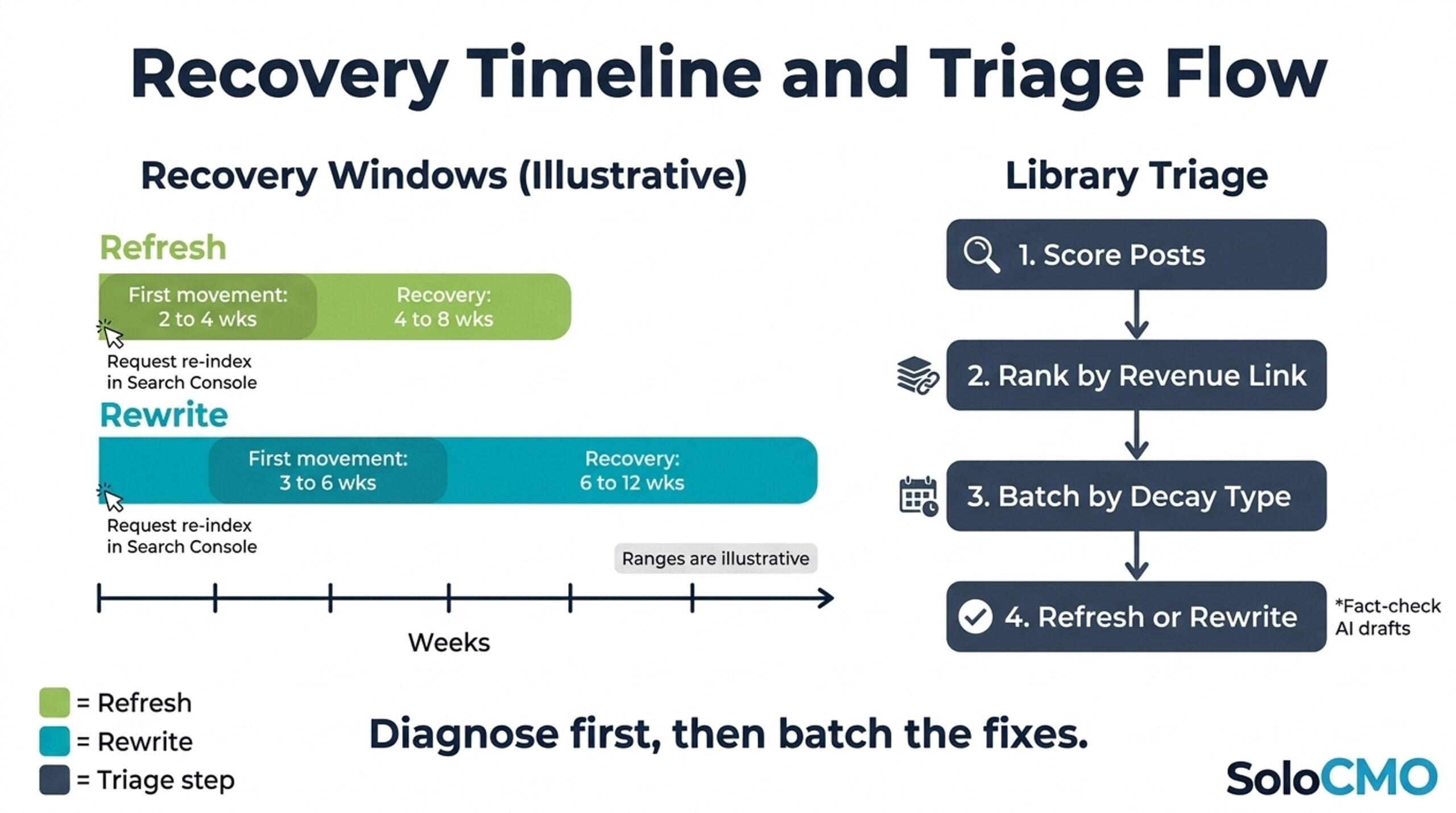
Indexing can take days after URL Inspection, and click-through rate signals often show within 2 to 7 days of a title or meta description change. Ranking movement usually appears in 2 to 4 weeks and stabilizes in 4 to 8, although visibility in AI answers tends to lag classic rankings. If nothing moves for two weeks after an update, tell clients that this is normal and show them the tracked timeline. Setting that expectation before you publish is what keeps a quiet fortnight from turning into a difficult call.
How do you triage 50 to 500 posts as a team of one?
Build a scoring sheet with columns for position band, click delta, impression delta, intent match, percent salvageable, revenue link, and backlinks, and work the revenue-linked pages first. Then batch by decay type, so one mental mode covers many posts, and use ChatGPT for first drafts under human fact-checking. Refresh existing content before commissioning a new article, and write the new article only when no current URL can answer the query, which keeps your content strategy focused on true gaps rather than duplicate topics. SoloCMO is built around output multiplication for one marketer, so a decay audit like this does not require a team.
What mistakes slow recovery, and what does an illustrative result look like?
Four mistakes cause most failed recoveries: refreshing a post whose search intent has changed, changing only the date, deleting URLs without a redirect, and over-optimizing with NLP tools. Each one is easy to avoid once you know to look for it, and the diagnosis steps above catch all four before work begins.
Consider an illustrative scenario, which is not a real client result: a post sits at position 9 with 2,400 monthly impressions and a 1.1% click-through rate. After a roughly 2-hour refresh, it moves to position 5, near the top of page one, and reaches a 2.6% click-through rate within about 6 weeks. The proof format clients want is hours spent against clicks gained.
Conclusion
Refresh to ship faster, and rewrite to recover faster when intent has drifted, but always diagnose before you decide. With a scoring sheet, a revenue-first order of attack, and batches grouped by decay type, you have a verdict you can defend to a client and a repeatable process in place of a gut call. Running that diagnosis across 50 to 500 posts is still a lot of work for one person. If it would help to see what the scope looks like for your own client library, you can Get Estimate from SoloCMO for a content decay audit and a refresh and rewrite plan. We built our product around output multiplication for a team of one, so you can get more done without adding headcount.
FAQ
How long does it take for a refreshed blog post to recover rankings?
A refreshed blog post typically shows first ranking movement within 2 to 4 weeks and stabilizes in 4 to 8 weeks. Because indexing takes days and AI visibility lags classic results, a tracked timeline helps set client expectations, while a professional triage keeps those expectations realistic.
When should you rewrite a blog post instead of updating it?
You should rewrite a blog post when search intent has changed or less than roughly 40% of the content is salvageable. A position below 20 and a traffic drop over 50% reinforce that call, and a proper diagnosis keeps this from becoming guesswork.
How do you know if a blog post is decaying?
A blog post is decaying when Google Search Console shows sustained click and impression declines against the prior period and last year. Separate AI Overviews click loss, where position holds but clicks fall, from true decay, since a professional audit can pinpoint which cause you actually have.
Does updating old blog posts improve SEO?
Updating old blog posts improves SEO when the update adds real accuracy, depth, or intent alignment, whereas date-only changes accomplish nothing useful. Matching the right fix to each post is where professional judgment saves time and avoids wasted effort, and a well-chosen update can lift a post’s ranking.
Should you change the URL when you rewrite a blog post?
You should keep the same URL when you rewrite a blog post unless the topic itself has changed. If it has, use a 301 redirect and update internal links to the final address. Redirect mapping is a common failure point, so it is worth an expert review.
How often should you refresh blog content?
Blog content should be refreshed when performance signals decline, with a quarterly check for revenue-linked posts. Signal-based refreshing beats a fixed calendar because it targets posts that actually need work, and a triage system can watch those signals so that you do not have to.
Recent Posts
Content Refresh vs Rewrite: Which Fixes Decaying Blog Posts Faster
A content refresh ships faster, usually in 1 to 3 hours versus 4 to 8 for a rewrite, but a rewrite recovers faster when the decay stems from a search intent mismatch. The rule of thumb is to refresh the post if it still matches what searchers want and most of it is salvageable, and to rewrite it if the

How to Build a Topic Cluster From Scratch for Your SaaS Blog
To build a topic cluster, pick a pillar topic that fits your product, collect subtopic keywords, group them by SERP overlap and intent, size the cluster, link every page to the pillar, publish in stages, then measure at cluster level. That is how to build a topic cluster in a way you can defend to a founder, and our topical authority

Where Leads Drop Off Between Ad Click and Signup
Funnel drop off between click and signup occurs at six points: the ad click, page load, above the fold, form start, form submit, and verification. The most significant leaks usually sit upstream, where the ad promise fails to match the page or where the page loads too slowly on mobile before the form ever appears. If your paid ad campaigns show
Get Smarter About Your Marketing
Practical SEO, AI, content, and marketing strategies you can put to work immediately.
Join the Newsletter